30 Desk removes a familiar obstacle to practice: setting everything up before you can make the first mark.
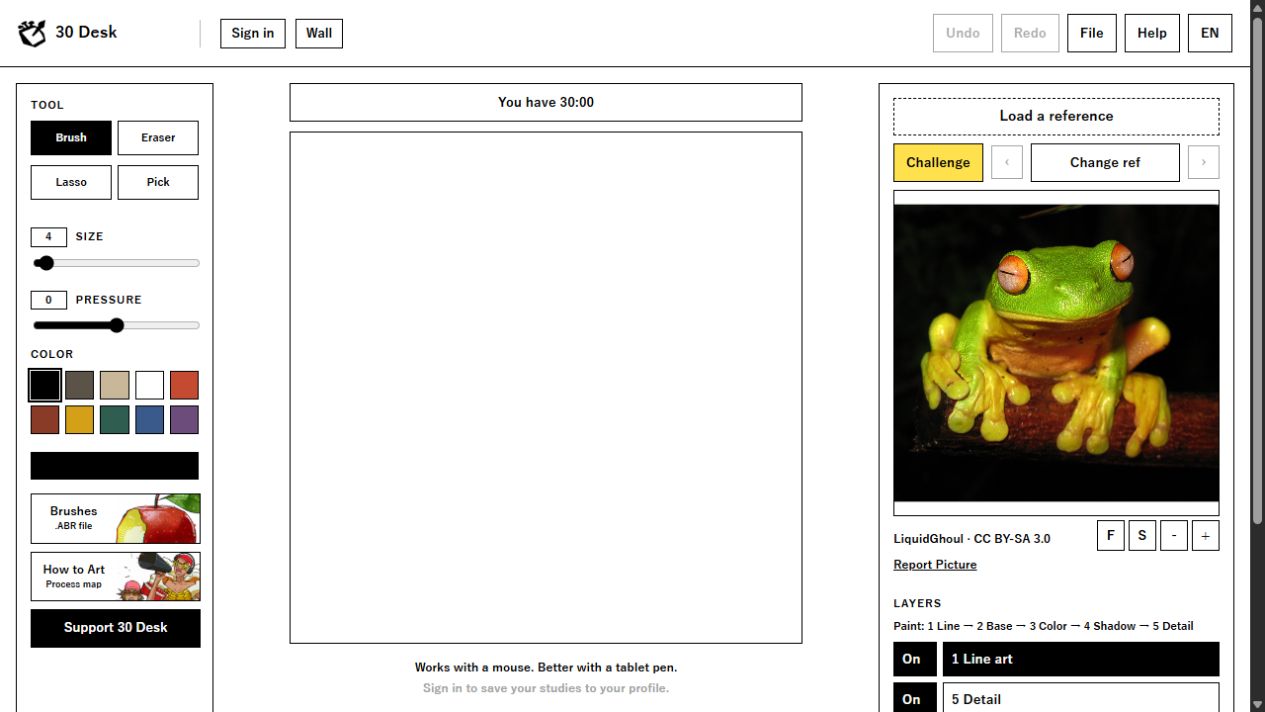
Created by Ramón Núñez, the browser-based painting space places a reference, a canvas and a 30-minute timer together. We opened the public workspace to see what is actually there. The screenshot above shows the real interface in English, before a painting session begins.
What is on the desk?
Drawing tools and colour controls sit on the left, the canvas occupies the centre, and the reference and layer stack sit on the right. The visible layer sequence suggests a progression from line art through base, colour, shadow and detail. Rather than switching between a photograph, a timer and a separate document, you can keep the essentials in view.
The workspace includes brush, eraser, lasso and colour-picking controls, plus ways to change the reference. The pictured frog reference carries a visible photographer credit and licence link. That matters: an image is not anonymous just because it is being used for practice.
Practice first, sharing second
The interface points visitors to a public Wall and offers sign-in to save studies to a profile. We did not create an account or post artwork during this inspection. Its own guidance recommends a desktop or tablet, and notes that a tablet pen gives a better drawing experience than a mouse.
Thirty minutes is a useful boundary, not a promise of instant improvement. For a first session, choose one visual question—perhaps the frog’s large light and dark shapes—rather than trying to resolve anatomy, texture, colour and polish at once. That is our suggested exercise, not a prescribed method from Ramón.
Before you begin
Open the tool on the device you actually draw with. Check the brush response, choose a reference and decide what you want to practise. At the end, keep a note of what worked and what you would change. A small, repeated observation is more useful than treating every study as a finished illustration.
Project spotlight. Ramón is a friend of Jesus Conde. This article is based on an inspection of the public workspace, not a review of account-only features. Interface screenshot © 30 Desk. Frog reference: LiquidGhoul, CC BY-SA 3.0.