A character’s outer shape and the painting inside it are two different problems. Separating them makes it easier to try a new color scheme without having to repair the same edges.
Contain color with a clipping mask
According to Adobe’s documentation, a clipping mask uses the visible content of a base layer to control the layers above it. For a painting, that base can be a flat silhouette. A clipped color layer then stays within the base’s non-transparent area.
Put the silhouette below a new painting layer, select that upper layer and choose Layer > Create Clipping Mask. The indentation and clipping indicator in the Layers panel help you identify the relationship. You can add more consecutive clipped layers for different painting decisions.
Revise visibility with a layer mask
A layer mask belongs to a particular layer and controls which parts remain visible. Adobe specifies white to reveal, black to hide and gray for partial visibility. Select the mask thumbnail before painting; otherwise your black brush may land on the artwork instead.
For example, you could keep a creature’s base shape intact while masking away a temporary part of a separate shadow pass. Painting white into that mask restores the hidden passage. This lets you compare alternatives without erasing the original pixels.
Study an outer edge before adding texture
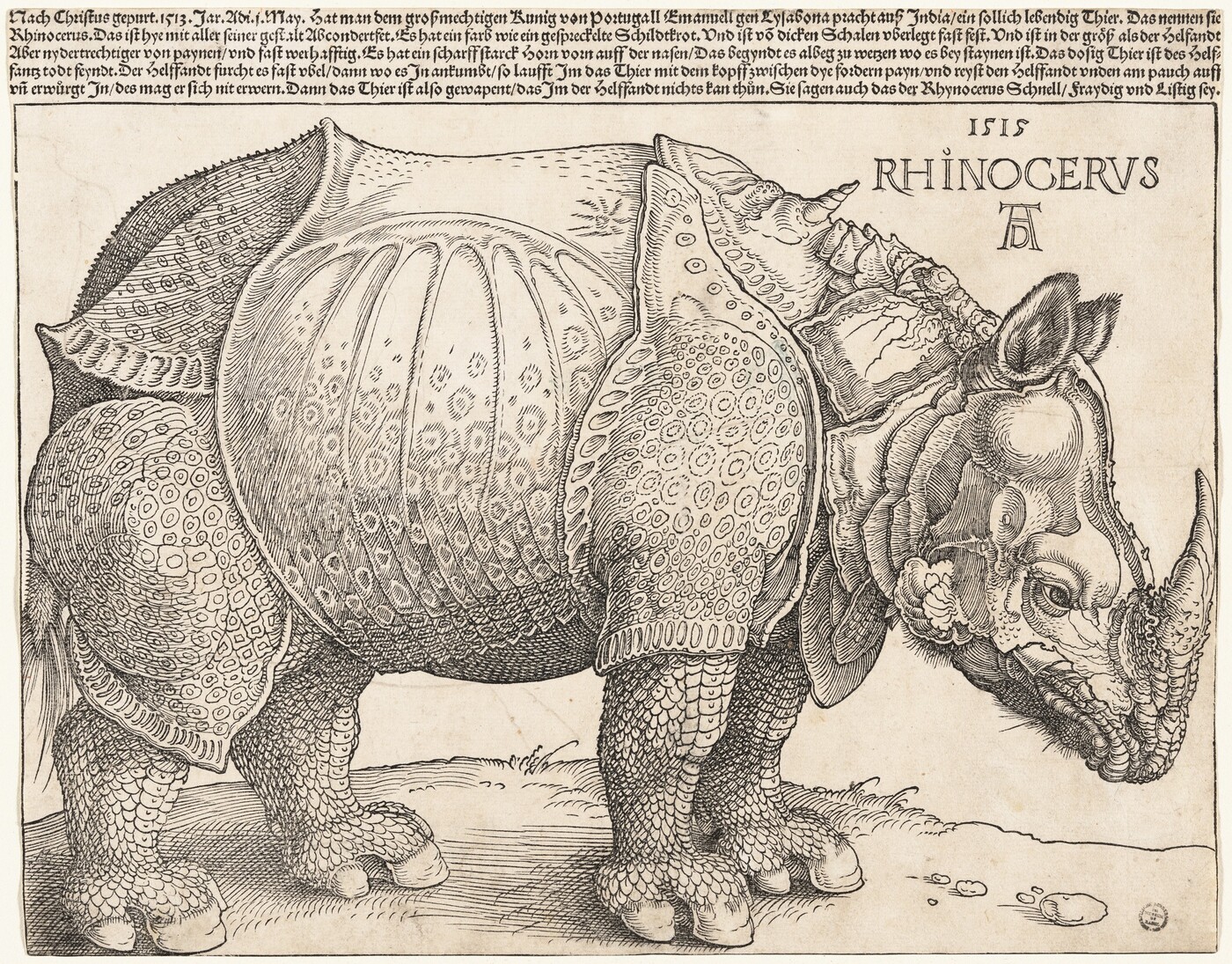
Dürer’s The Rhinoceros, shown here through the National Gallery of Art’s public-domain collection, offers a useful silhouette to examine. This is a historical woodcut, not a digital layer demonstration or an anatomical reference. Our visual observation is that the heavy body, head and legs remain legible even before the dense surface markings are considered.
That separation is useful for a fantasy creature study: if the overall pose is unclear, interior texture cannot solve it. A clean base shape lets you judge the pose without the distraction of scales, scratches or color variation.
A small painting exercise
- Draw an original creature as one flat shape on a transparent layer. Keep the background separate.
- Add a clipped layer named “Color variation.” Paint several broad patches that cross the silhouette’s boundary and observe how the base contains them.
- Add another clipped layer for a shadow idea. Give that layer a mask and hide part of the shadow to test a different lighting pattern.
- Toggle the painted layers off. The base silhouette should still read as a coherent pose.
This is an editorial practice exercise, not a reconstruction of Dürer’s process. Keep layer names tied to decisions you may need to change. If you cannot explain what a layer controls, simplify the stack before adding another effect.
A useful working rule is to use clipping for containment and a mask for local visibility. They can cooperate, but neither replaces a clearly designed silhouette.